

Trends page
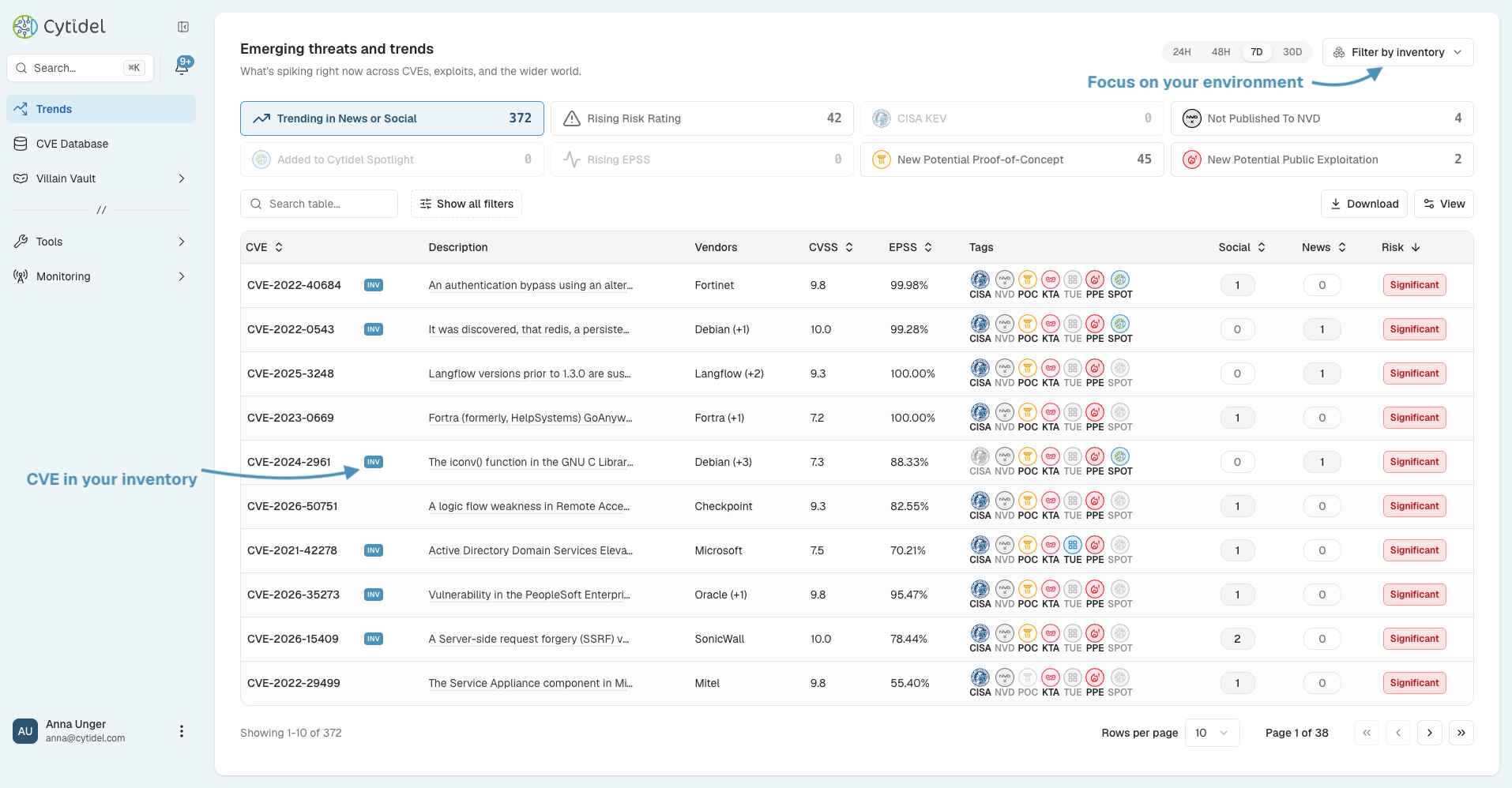
The Trends page highlights vulnerabilities that are gaining attention or becoming more relevant across the threat landscape — so you can prioritise based on real-world momentum, not just severity scores. Rather than analysing thousands of vulnerabilities one by one, it groups CVEs into trend signals you can explore, and you can focus the whole page on your own environment.
Jump to a section:
- Focus the page on your environment
- Emerging threats and trends
- Adjusting the time window
- Investigating a vulnerability
- When to use the Trends page
Focus the page on your environment
By default the page shows what's trending worldwide. Use Filter by inventory to narrow it to the vendors and products you track, or to specific labels (for example, only software labelled Internal). CVEs that affect your inventory are marked with an INV badge, so you can spot what's relevant to you at a glance. (For more on inventories and labels, see the Building your inventory guide.)
Emerging threats and trends
Vulnerabilities are grouped into trend signals — switch between them to view the landscape from different angles:
- Trending in News or Social — actively discussed in security research, blogs, forums, or social media. High discussion often signals a new disclosure or growing attention.
- Rising Risk Rating — the risk rating has climbed over time as new intelligence emerges. Good for spotting ones becoming more dangerous after disclosure.
- CISA KEV — listed in CISA's Known Exploited Vulnerabilities catalogue; confirmed exploited in the wild. Usually a top remediation priority.
- Not Published to NVD — not yet in the National Vulnerability Database, often from early disclosures such as vendor advisories or research — a potential emerging threat.
- Added to Cytidel Spotlight — flagged by Cytidel's analysts and intelligence systems as particularly important.
- Rising EPSS — a notable increase in EPSS (Exploit Prediction Scoring System), indicating a growing probability of exploitation.
- New Potential Proof-of-Concept — new proof-of-concept exploit code has recently appeared, which can increase the likelihood of real-world exploitation.
- New Potential Public Exploitation — new signals suggest active exploitation, such as attack reports or discussion of real-world abuse.
The table beneath shows each CVE with its description, affected vendors, CVSS and EPSS scores, intelligence tags (CISA, NVD, POC, KTA, TUE, PPE, SPOT — see the What are intel tags? guide), and its social and news activity, along with a risk rating. You can search the table, open Show all filters to refine it, adjust columns with View, or Download the list.
Adjusting the time window
Change the timeframe with the 24H / 48H / 7D / 30D control:
- 24H — detect newly emerging threats.
- 48H — monitor recent vulnerability activity.
- 7D — understand weekly developments.
- 30D — review longer-term trends.
Shorter windows highlight recent activity; longer windows give broader context.
Investigating a vulnerability
Each entry represents a vulnerability, with its CVE identifier, affected vendor, intelligence signals, and activity levels. Select one to open its detailed intelligence page, where you can explore its threat context, affected vendors and products, exploit information, and — for vulnerabilities included in Cytidel Spotlight — remediation guidance. (See the CVE details guide.)
When to use the Trends page
Security teams typically use the Trends page to:
- detect newly emerging vulnerabilities
- monitor rapidly evolving threat intelligence
- identify vulnerabilities moving toward exploitation
- prioritise patching based on real-world threat signals
- see how global activity maps to their own environment
Reviewing the Trends page regularly helps you stay ahead of vulnerabilities before they become widespread threats. Need a hand? Email us at [email protected].
Updated 2 months ago